
TeamSnap ONE
TeamSnap, Inc.Sports
4.954.00 Reviews
- Version
- 1.52.0+production-release.7835
- Installs
- 100.00K
- Age Rating
- Everyone
Screenshots
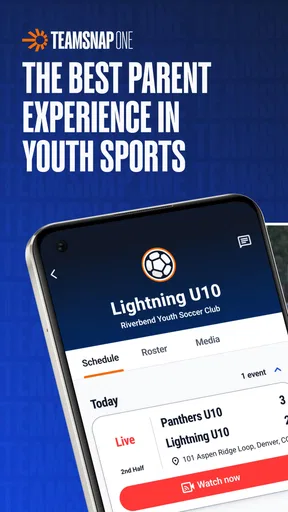
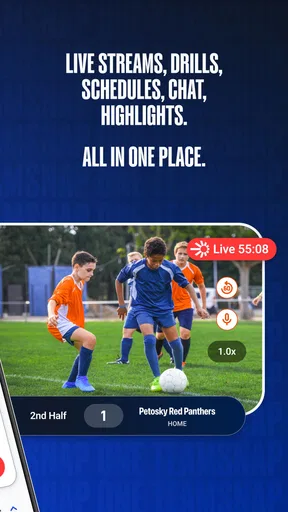
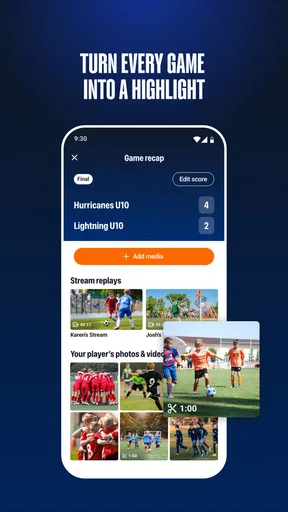
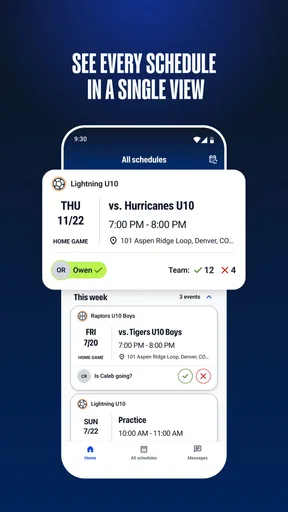

Our Review of TeamSnap ONE
 Analysis by Appyee
TeamSnap ONE is a sports app from TeamSnap, Inc. that takes a noticeably different approach from the usual open sign-up team manager. It is an invite-only experience, so it is designed around joining a specific sports community rather than browsing for a club or creating an account with no connection to an existing group. I found that distinction important from the first moment: the app makes more sense when a coach, organizer, school, or team has already invited you.
That narrow entry point can be either its biggest strength or its first frustration. If your child’s team or your own sports group is using it, the app has a clear purpose and can bring team-related information into one place. If you are simply looking for a general sports planner, a public training app, or a way to discover local activities, this is probably not the right starting point. The experience is built for connected participants, not casual visitors.
How TeamSnap ONE works in everyday sports situations
When I think about using TeamSnap ONE around a busy sports week, the key is to make the invitation a dependable starting point rather than another notification to chase. I would check the team space before setting out, then confirm with the organizer where urgent changes will appear. That small routine helps reveal whether the group’s communication habits fit the app—and leads to the practical question of which teams benefit most from that focused setup.
A focused starting point for invited members
The store describes TeamSnap ONE as an innovation-lab experience from TeamSnap, and that experimental character comes through in how focused it feels. Rather than presenting itself as a giant sports platform with every possible tool, it centers the relationship between an invitation and the group behind it. That can reduce the mental effort of deciding where to begin, especially for parents who only need information connected to one team.
In a realistic weekday example, imagine receiving an invitation before a child’s evening practice. You install the app, enter through the invitation, and use the team space as the reference point for the activity. The useful habit is to treat the app as a shared source of context rather than another place to casually browse. Before leaving home, I would check the team area, confirm what applies to that day, and then close the app instead of searching through unrelated sports content.
That workflow is particularly helpful for families balancing several calendars. A parent may not want a full sports-management system with menus for teams they do not manage. An invite-only design can keep attention on the one group that matters. The trade-off is obvious: if your invitation is missing, outdated, or connected to the wrong group, the app’s focused design gives you little reason to stay inside it.
Readability and navigation in practical use
For readability, the most important question is not whether the app looks attractive but whether a tired user can identify the next action quickly. TeamSnap ONE benefits from having a clear social and sporting context. When an app is tied to one invited experience, labels and destinations have a better chance of feeling relevant than the broad navigation found in many all-purpose sports platforms.
I would still recommend taking a few seconds to learn the screen structure before relying on it during a rushed morning. Sports information is often checked while someone is packing equipment, walking through a car park, or answering a child’s question. A layout that seems obvious while sitting quietly can feel less obvious when attention is divided. My practical tip is to open the app once at home, identify where the team’s main information lives, and avoid waiting until the first match or practice to learn the route.
The app is free to download, which lowers the barrier for invited participants who do not want to commit money before seeing whether their group uses it effectively. Its average rating is 4.7 from around 700 ratings, a positive signal that the basic experience has worked well for many people. I would treat that as encouragement rather than a guarantee, because the value of an invite-only product also depends on how consistently the organizer uses it.
For people who need very large text, strong contrast, screen-reader-friendly labels, or a highly predictable focus order, I would not assume that an attractive or simple interface automatically solves those needs. The safest approach is to test the actual screens on the device and operating-system settings you use. The app supports a minimum operating system of 10, so users on older systems may need to check compatibility before planning around it.
Motor and sensory considerations
Team sports already create a noisy information environment. A player may be moving between activities, a parent may be carrying equipment, and a coach may be handling several conversations at once. In that setting, an invite-based app can help by narrowing the digital task to the relevant group. Fewer irrelevant destinations can mean fewer taps and less visual searching.
That advantage is strongest for people who can comfortably use a phone but find crowded apps tiring. Someone with attention-related challenges may appreciate a direct connection to one team instead of a large catalog of sports functions. A family member with limited time or limited confidence using mobile apps may also find the smaller purpose easier to explain: open the invitation, enter the team experience, and look for the information associated with the group.
Motor access is more complicated. Any sports app can become awkward if important actions require precise tapping, repeated scrolling, or quick responses while the user is in motion. I would use TeamSnap ONE before leaving for an event, not while walking across a busy venue. If a player has tremors, reduced dexterity, or fatigue, preparing the relevant information in advance is a sensible workaround. It reduces the need for hurried interaction when the phone is being used one-handed or in poor conditions.
Sensory needs also vary widely. A person who is sensitive to visual clutter may prefer the focused nature of an invited team space. Someone who relies on audio cues, magnification, or customized display settings should check how the app behaves with those tools on their own device. I would avoid promising an accessibility feature merely because the app is simple; simplicity and technical accessibility are related, but they are not the same thing.
There is another subtle benefit for households with different levels of digital confidence. The person who receives the invitation does not necessarily need to understand every sports-management concept. A parent can help a child get oriented once, while the child later returns to the same group context. That is more approachable than handing a young athlete a broad platform and expecting them to understand team administration, schedules, communication, and account roles all at once.
Situational access beyond the ideal phone experience
TeamSnap ONE makes the most sense when the user has a stable invitation and a clear reason to open it. It is less convincing as a tool for spontaneous discovery. If you are comparing local leagues, searching for training ideas, or organizing an informal game with people who are not already connected through the app, the invite-only model may feel restrictive rather than streamlined.
It can also serve different people in the same sports group in different ways. A player may use it as a quick reference, while a parent may need it to stay aligned with the team’s activity. An organizer may judge it by whether participation is easy to coordinate. Those roles do not have identical access needs. A design that feels wonderfully uncluttered to a participant may seem too limited to someone who expects extensive administrative control.
This is where the app compares interestingly with familiar alternatives. A general calendar gives you flexibility but leaves you responsible for entering and maintaining sports details. A messaging group is immediate, yet important information can disappear under newer conversations. A full team-management service may offer more controls, but it can also introduce more menus and responsibilities than an ordinary participant wants. TeamSnap ONE occupies a middle ground: more connected than a personal calendar, more structured than a chat, and potentially less expansive than a mature administrative platform.
That middle ground is useful when the team has a shared habit. If every parent checks the app and organizers keep the team experience current, the invitation becomes a simple doorway into a common routine. If only some members use it, the app cannot solve the communication problem by itself. An inclusive digital tool still depends on the group agreeing where essential information belongs.
Where the experience may still create barriers
The first barrier is access itself. An invite-only product is not equally open to everyone who is interested in sports. A new participant must already be connected to the relevant group, and someone who is waiting for an invitation may not know whether the issue is their account, the organizer’s process, or the team’s setup. That is a social and practical barrier, not merely a navigation problem.
The second is shared responsibility. TeamSnap ONE can make information easier to reach, but it cannot guarantee that an organizer communicates in a way every participant can understand. If a team relies on vague messages, inconsistent updates, or last-minute changes, a clean app interface will not remove the resulting confusion. I would judge the product together with the group’s communication habits, not in isolation.
The third is the possibility of mismatch between the app’s focused purpose and a user’s expectations. Someone who wants detailed personal training plans, open sports discovery, or broad event management may download it and wonder why it does not behave like those products. That is not necessarily a flaw in the app, but it is a reason to choose carefully. The right question is not “Does this do everything?” but “Does my invited team use this for the things I actually need?”
There is also a cost consideration once an invited group begins using paid functionality. The app itself is free, while in-app purchases range from $9.99 to $69.99 per item. That does not automatically make it poor value, but it means families should understand who is expected to pay and what the purchase supports before treating the app as essential. A tool becomes less inclusive when a participant cannot tell whether payment is optional, team-wide, or necessary for a particular experience.
The age rating is Everyone, which fits the broad family and team setting. Even so, parents should still think about how invitations, team communication, and device use fit their household rules. An age label is useful context, but it does not replace supervision or clear guidance about when a child should use a sports communication app independently.
Who will benefit most from it
I see TeamSnap ONE working best for invited players, parents, and participants who want a focused connection to an existing sports group. It is especially suitable when the team has already chosen TeamSnap’s environment and wants members to use one recognizable entry point instead of scattering information across calendars, texts, and social platforms.
It may also suit people who become overwhelmed by broad apps. The invitation gives the experience a defined boundary, and that boundary can make the app feel less demanding. For a parent managing several responsibilities, the ability to open one relevant team context may be more valuable than a long list of advanced tools they will never touch.
I would be more cautious for independent athletes who want to discover activities without joining a group, coaches seeking a deeply configurable management suite, or users who need guaranteed support for specific accessibility workflows. In those cases, a general sports platform, a dedicated calendar, or a tool already tested with the user’s assistive setup may be a better choice. TeamSnap ONE is not a universal replacement for all three.
Version, longevity, and the decision to try it
The current version is 1.41.0+production-release.6918, and the app was released on June 10, 2025. Those details matter because this is a relatively new experience rather than a product I would evaluate as a finished replacement for every established sports tool. The innovation-lab positioning suggests that users should be comfortable with an app that may continue to develop around how teams and participants use it.
That does not make it a bad choice. In fact, early users may appreciate a more focused direction than the accumulated complexity of a long-established platform. My advice is to try it with one real team workflow first. Confirm that the invitation arrives correctly, that the important information is understandable, and that the people who need access can use the app with their preferred device settings. Those checks reveal more than a download alone.
I would also keep a simple backup habit during the first few weeks: know where the team’s essential information can be found if a participant cannot open the app at the moment it is needed. This is not a criticism unique to TeamSnap ONE; it is sensible for any digital tool used around travel, children, competitions, or changing schedules. The more important the event, the less wise it is to depend on an unfamiliar workflow without preparation.
My inclusive verdict
After looking at it as both a sports participant’s tool and an access experience, I think TeamSnap ONE has a clear idea behind it. The invite-only structure can reduce clutter, give families a shared destination, and make a team’s digital space feel more purposeful than a general sports app. Its free entry and Everyone rating also make it approachable for a wide range of households, while the strong average rating suggests that many users find the core experience worthwhile.
Its limits are just as important. It is not designed for open sports discovery, and it may not satisfy users who need extensive administration or a carefully documented accessibility workflow. The app’s success depends heavily on the team’s invitation process and communication discipline. Paid items can also introduce questions about affordability and responsibility that should be settled before the app becomes central to participation.
My recommendation is to use it when your team has already invited you and is committed to making it the shared place for sports information. In that situation, the focused design may save time and reduce the confusion caused by scattered messages. If you are choosing an app independently, need broad sports planning, or require specific accessibility guarantees, compare it with alternatives before committing. For the right invited group, however, TeamSnap ONE is a promising, focused sports companion rather than just another crowded team app.
Privacy and Permissions
See what permissions an app requests and how it handles your data.
- Location
- precise location (GPS and network-based)
- Photos/Media/Files
- read the contents of your USB storage, modify or delete the contents of your USB storage
- Storage
- read the contents of your USB storage, modify or delete the contents of your USB storage
- Camera
- take pictures and videos
- Microphone
- record audio
- Wi-Fi connection information
- view Wi-Fi connections
- Other
- view network connections, pair with Bluetooth devices, access Bluetooth settings, change network connectivity, connect and disconnect from Wi-Fi, full network access, change your audio settings, run at startup, prevent device from sleeping, Google Play license check
Verdict
Strengths of TeamSnap ONE
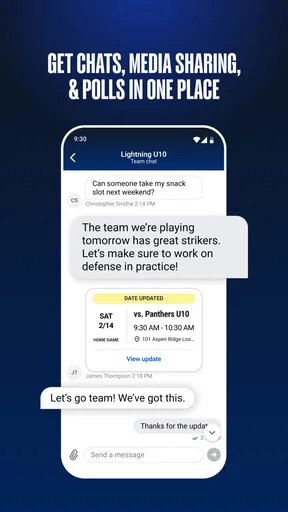
- Centralizes team schedules, chats, rosters, and updates in one app.
- Push notifications help families stay informed about last-minute changes.
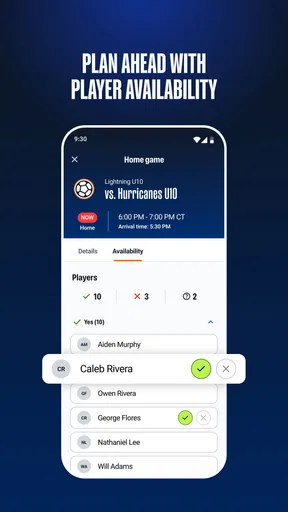
- Useful availability tools simplify attendance and lineup planning.
- Supports multiple teams, making it practical for active sports families.
- Coaches can share announcements and key information with the whole team.
Limitations of TeamSnap ONE
- Some features may require a paid team subscription or premium plan.
- The interface can feel crowded when managing several teams at once.
- Notification settings may need manual adjustment to avoid excessive alerts.
- Account setup depends on receiving an invitation or team access details.
- Performance and available features can vary between organizations and plans.
Other Releases by TeamSnap, Inc.
View All
TeamSnap: manage youth sports
Sports3.0
Similar Picks in This Category
View All
BeSoccer: Soccer Live Score
BeSoccer apps4.3

Cricbuzz - Live Cricket Scores
Cricbuzz.com3.7

NFL
NFL Enterprises LLC2.4

Da Fit
MO YOUNG LIMITED3.6

ESPN
Disney4.5

LiveScore: Live Sports Scores
LiveScore Limited4.5
Frequently Asked Questions
What is TeamSnap ONE, and who is it designed for?
TeamSnap ONE is a sports team and organization management platform that brings scheduling, communication, registration, payments, rosters, and team information into one place. It is designed for youth sports clubs, leagues, coaches, administrators, players, and parents. Depending on the organization’s subscription and setup, available tools may differ, so not every user will see exactly the same features.
Can parents and players use TeamSnap ONE to view schedules and receive updates?
Yes. Parents and players can typically use TeamSnap ONE to access upcoming games, practices, events, locations, rosters, announcements, and other team information. Notifications may be delivered through the app or by email, depending on the organization’s settings. Users should enable notifications and keep their contact details current to avoid missing schedule changes, cancellations, or important messages.
Does TeamSnap ONE support registration and online payments?
TeamSnap ONE may allow sports organizations to manage player registration, fees, forms, and online payments through the platform. Whether these options are available depends on how the club or league has configured its account. Payment methods, deadlines, refunds, installment plans, and additional charges can vary, so families should review the organization’s registration information carefully before completing a purchase.
Is TeamSnap ONE free to download and use?
Downloading the TeamSnap ONE app may be free, but access to certain services is connected to the sports organization using the TeamSnap platform. Some teams or clubs may cover the cost, while others may charge registration fees or pass along service-related costs. The app itself does not necessarily mean that participation, registration, uniforms, or other team expenses are free.
What should I do if my team, schedule, or account is missing in TeamSnap ONE?
If your team or information does not appear, first confirm that you signed in with the same email address used by your club or league and check whether you have accepted the invitation to join. Also update the app and refresh your account. If the problem continues, contact your coach or organization administrator, since they usually control team assignments, permissions, schedules, and account invitations.
